

Measuring Tools
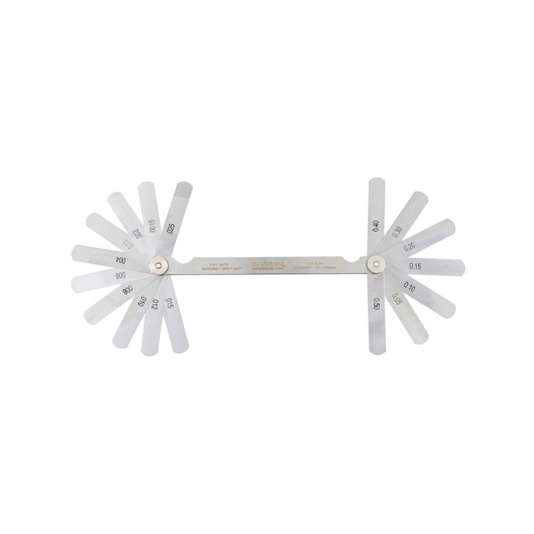
Kennedy Double Ended Imperial & Metric Feeler Gauge
Hardened and polished taper blades enclosed in a steel case. Blades are clearly marked for easy reading and are manufactured to DIN 2275.
Features and Benefits
• Hardened and polished blades for increased tool life
• Blades are clearly marked for easy readings
• Supplied in a steel case for easy storage and portability
Standards
• DIN 2275
Notes
• Blade length: (75mm/3")
• Metric: (0.05mm - 0.5mm)
• Inch: (0.0015" - 0.025")
Features and Benefits
• Hardened and polished blades for increased tool life
• Blades are clearly marked for easy readings
• Supplied in a steel case for easy storage and portability
Standards
• DIN 2275
Notes
• Blade length: (75mm/3")
• Metric: (0.05mm - 0.5mm)
• Inch: (0.0015" - 0.025")
Download
Produk Lainnya
Key features
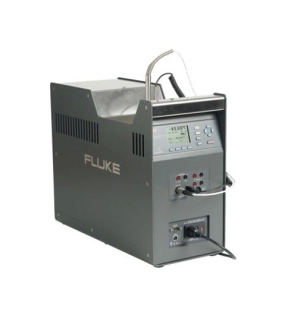
Ultra-cool dry-block calibrator with best-in-class stability
The Fluke 9190A Ultra-Cool Field Metrology Well is the most accurate and stable, cold temperature dry-block on the market. It’s ideal for applications that demand strict quality control and regulatory process compliance. These applications include on-location validation and calibration of RTDs, thermocouples, thermometers, and sensors used with process control equipment such as medical freezers, laboratory refrigerators, cold rooms, blood banks, sterilizers (autoclaves), and freeze dryers.
Wide temperature range
–95 °C to 140 °C
Excellent accuracy
Accuracy using built-in referencethermometer readout: ±0.05 °C full range
Display accuracy: ±0.2 °C full range
Best-in-class stability
±0.015 °C full range
Fast cooling time
23 °C to –90 °C: 80 minutes
23 °C to –95 °C: 90 minutes
140 °C to 23 °C: 60 minutes
Portability
Weighs only 16 kg (35 lbs)
Built-in front and back handlesfor easy two-handed carry
Best measurement practices
Conforms with EURAMET cg-13 guidance on measurement practices for temperature calibrators
Ultra-cool dry-block calibrator with best-in-class stability
The Fluke 9190A Ultra-Cool Field Metrology Well is the most accurate and stable, cold temperature dry-block on the market. It’s ideal for applications that demand strict quality control and regulatory process compliance. These applications include on-location validation and calibration of RTDs, thermocouples, thermometers, and sensors used with process control equipment such as medical freezers, laboratory refrigerators, cold rooms, blood banks, sterilizers (autoclaves), and freeze dryers.
Wide temperature range
–95 °C to 140 °C
Excellent accuracy
Accuracy using built-in referencethermometer readout: ±0.05 °C full range
Display accuracy: ±0.2 °C full range
Best-in-class stability
±0.015 °C full range
Fast cooling time
23 °C to –90 °C: 80 minutes
23 °C to –95 °C: 90 minutes
140 °C to 23 °C: 60 minutes
Portability
Weighs only 16 kg (35 lbs)
Built-in front and back handlesfor easy two-handed carry
Best measurement practices
Conforms with EURAMET cg-13 guidance on measurement practices for temperature calibrators
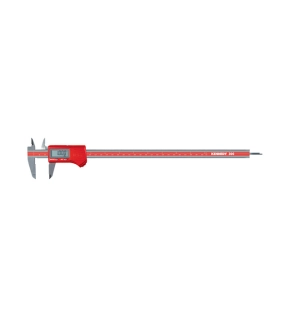
Available in a range of sizes, this digital caliper is coolant, water and dust proof to IP67 level. It has a large LCD display, fast response speed, dual readout (mm/inch) and can be used for inside, outside, depth and step measuring. Also enables absolute and relative reading.
Extra batteries available - Order Code PAN9042505E 3V Lithium Metal cell
Extra batteries available - Order Code PAN9042505E 3V Lithium Metal cell
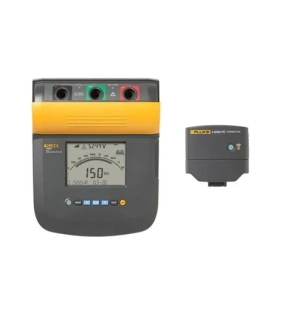
The Fluke 1550C performs digital insulation testing up to 5 kV, and makes data collection easy through the Fluke Connect™ wireless app. Remote operation lets you spend as little time as possible in potentially hazardous zones. Real-time trending shows a live graph on your phone, rather than a hard-to-read set of changing values. And you can create reports quickly, using pre-designed templates that you can customize with company logos. It’s the perfect tool for preventive or predictive maintenance programs designed to identify potential equipment failures before they occur. And it comes with a three-year warranty and CAT IV 600 V safety rating.
Other useful features
• Automatic calculation of Dielectric Absorption (DAR) and Polarization Index (PI) with no additional setup
• Guard system eliminates the effect of surface leakage current on high-resistance measurements
• Selectable test voltages in 50 V steps from 250 V to 1000 V, and 100 V steps above 1000 V
• CAT III 1000 V, CAT IV 600 V safety rating
• Warning function alerts the user that line voltage is present and gives the voltage reading up to 600 V AC or DC for increased user safety
• Measurements can be stored in up to 99 memory locations, with each location assigned a unique, user defined, label for easy recall
• Long battery life gives the user over 750 tests between charges
• Large digital/analog LCD for easy viewing
• Capacitance and leakage current measurement
• Ramp function for breakdown testing
• Resistance measurements up to 2 TΩ
• Timer settings up to 99 minutes for timed tests
• 3-year warranty
Key Features
• Quickly configure, start and stop tests remotely, a safe distance away from any operating, energized equipment, using Fluke Connect® and a smart phone
• Real time trending gives you easy-to-see visual cues
• Report creation using Fluke Connect desktop saves time and makes test results easier to understand
• Fluke Connect saves test results to the cloud for analysis and preventive maintenance
Other useful features
• Automatic calculation of Dielectric Absorption (DAR) and Polarization Index (PI) with no additional setup
• Guard system eliminates the effect of surface leakage current on high-resistance measurements
• Selectable test voltages in 50 V steps from 250 V to 1000 V, and 100 V steps above 1000 V
• CAT III 1000 V, CAT IV 600 V safety rating
• Warning function alerts the user that line voltage is present and gives the voltage reading up to 600 V AC or DC for increased user safety
• Measurements can be stored in up to 99 memory locations, with each location assigned a unique, user defined, label for easy recall
• Long battery life gives the user over 750 tests between charges
• Large digital/analog LCD for easy viewing
• Capacitance and leakage current measurement
• Ramp function for breakdown testing
• Resistance measurements up to 2 TΩ
• Timer settings up to 99 minutes for timed tests
• 3-year warranty
Key Features
• Quickly configure, start and stop tests remotely, a safe distance away from any operating, energized equipment, using Fluke Connect® and a smart phone
• Real time trending gives you easy-to-see visual cues
• Report creation using Fluke Connect desktop saves time and makes test results easier to understand
• Fluke Connect saves test results to the cloud for analysis and preventive maintenance
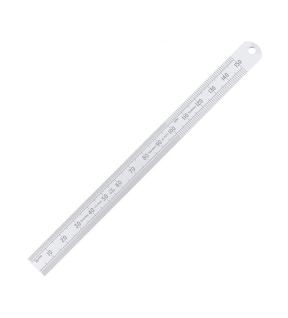
The range of Kennedy round end engineers rulers are made from spring tempered flexible steel blades with permanent black figures and graduations. With rustless properties and 12mm blade width and and a satin chrome anti-glare finish they are extremly easy to read with EEC Class one accuracy (/- 0.2mm full scale). Features a handy hanging hole for easy storage.
Features and Benefits
• Spring tempered flexible steel blades with round end
• Anti-glare properties
• With hanging hole for easy storage
• Permanent black figures and graduations
• ECC Class one accuracy
Typical Applications
• Measurements
• Engineering
• Industrial
• Workshop
• On site
Notes
• Available in imperial and metric measurements
Features and Benefits
• Spring tempered flexible steel blades with round end
• Anti-glare properties
• With hanging hole for easy storage
• Permanent black figures and graduations
• ECC Class one accuracy
Typical Applications
• Measurements
• Engineering
• Industrial
• Workshop
• On site
Notes
• Available in imperial and metric measurements